HP 960 - Manuale d'uso
Telecamera web HP 960 – Manuale d'uso, leggi gratuitamente online in formato PDF. Speriamo che questo ti aiuti a risolvere eventuali dubbi. Se hai ulteriori domande, contattaci tramite il modulo di contatto.
*N17478-371*
N17478-371
PRINTER: Replace this box with Printed- In (PI) Statement(s) as per spec.
NOTE: This box is simply a placeholder. PI Statement(s) do not have to fit inside
the box but should be placed in this area.
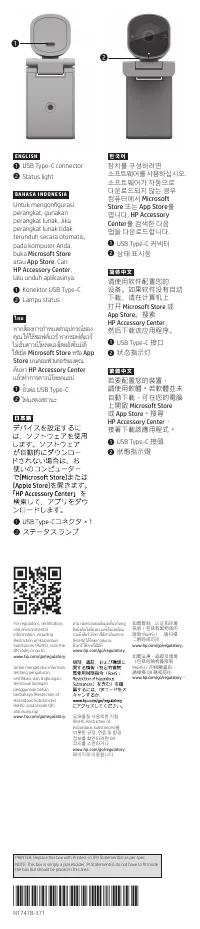
1
2
E N G L I S H
1
USB Type-C connector
2
Status light
B A H A S A I N D O N E S I A
Untuk mengonfigurasi
perangkat, gunakan
perangkat lunak. Jika
perangkat lunak tidak
terunduh secara otomatis,
pada komputer Anda,
buka
Microsoft Store
atau
App
Store
. Cari
HP Accessory Center
,
lalu unduh aplikasinya.
1
Konektor USB Type-C
2
Lampu status
ไท ย
หากต้องการกำาหนดค่าอุปกรณ์ของ
คุณ
ให้ ใช้ซอฟต์แวร ์
หากซอฟต์แวร ์
ไม่เริ่มดาวน์ โหลดเองโดยอัตโนมัติ
ให้เปิด
Microsoft Store
หรือ
App
Store
บนคอมพิวเตอร ์ของคุณ
ค้นหา
HP Accessory Center
แล้วทำาการดาวน์ โหลดแอป
1
ขั้วต่อ
USB Type-C
2
ไฟแสดงสถานะ
For regulatory, certification,
and environmental
information, including
Restriction of Hazardous
Substances (RoHS), scan the
QR code, or go to
www.hp.com/go/regulatory
.
Untuk mengetahui informasi
tentang pengaturan,
sertifikasi, dan lingkungan,
termasuk larangan
penggunaan bahan
berbahaya (Restriction of
Hazardous Substances/
RoHS), pindai kode QR,
atau kunjungi
www.hp.com/go/regulatory
.
สามารถตรวจสอบข้อมูลเกี่ยวกับกฎ
ข้อบังคับ
ใบรับรอง
และสิ่งแวดล้อม
รวมถึงข้อจำากัดการใช้สารอันตราย
(RoHS)
ได้ โดยการสแกน
คิวอาร ์ โค้ด
หรือไปที่
www.hp.com/go/regulatory
유해물질
사용제한
지침
(RoHS: Restriction of
Hazardous Substances)
을
비롯한
규정
,
인증
및
환경
정보를
확인하려면
QR
코드를
스캔하거나
www.hp.com/go/regulatory
페이지로
이동합니다
.
如需管制、认证和环境
信息(包括有害物质的
限制
(RoHS)
),请扫描
二维码或访问
www.hp.com/go/regulatory
。
如需法規、認證及環境
(包括危險物質限制
(RoHS)
)的相關資訊,
請掃描
QR
碼或前往
www.hp.com/go/regulatory
。
한 국 어
장치를
구성하려면
소프트웨어를
사용하십시오
.
소프트웨어가
자동으로
다운로드되지
않는
경우
컴퓨터에서
Microsoft
Store
또는
App Store
를
엽니다.
HP Accessory
Center
를 검색한 다음
앱을 다운로드합니다.
1
USB Type-C
커넥터
2
상태
표시등
简 体 中 文
请使用软件配置您的
设备。如果软件没有自动
下载,请在计算机上
打开
Microsoft Store
或
App
Store
。搜索
HP Accessory Center
,
然后下载该应用程序。
1
USB Type-C
接口
2
状态指示灯
繁 體 中 文
若要配置您的裝置,
請使用軟體。若軟體並未
自動下載,可在您的電腦
上開啟
Microsoft Store
或
App
Store
。搜尋
HP Accessory Center
,
接著下載該應用程式。
1
USB Type-C
接頭
2
狀態指示燈
"Caricamento delle istruzioni" significa che è necessario attendere finché il file non è caricato e pronto per la lettura online. Alcune istruzioni sono molto grandi e il tempo di caricamento dipende dalla velocità della tua connessione a Internet.
Questo manuale ti è stato utile?
Informazioni su questo manuale
- Marca
- HP
- Modello
- 960
- Tipo di documento
- Manuale d'uso
- Categoria
- Telecamera web
- Lingua/e
- Tedesco, Inglese, Spagnolo, Francese, Italiano, Dutch, Russo
- Pagine
- 1
- Dimensione file
- 1,6 MB
- Formato
Fai una domanda
Manuali correlati
Altri elettrodomestici HP
 HP 1160 Manuale
 HP 1215 Manuale
 HP 2700 Series Manuale
 HP 2710 Manuale d'uso
 HP 3392 Manuale
 HP 3550 Manuale
 HP 4752 Manuale
 HP 5400 Manuale
 HP 7030 Manuale
 HP 7600 Manuale
 HP A7217A Manuale
 HP C9730A Manuale
- HP C9731A Manuale
- HP C9732A Manuale
- HP C9733A Manuale
 HP CM1015 MFP Manuale
 HP CP3525 Manuale
 HP Designjet T630 Manuale d'uso
 HP Designjet T730 Manuale d'uso
 HP Designjet T830 Manuale d'uso