Asus GX601 - Manuale d'uso
Custodia per PC Asus GX601 – Manuale d'uso, leggi gratuitamente online in formato PDF. Speriamo che questo ti aiuti a risolvere eventuali dubbi. Se hai ulteriori domande, contattaci tramite il modulo di contatto.

Indice:
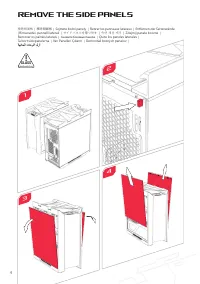
- Pagina 3 – Remove the Side Panels
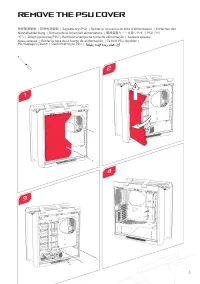
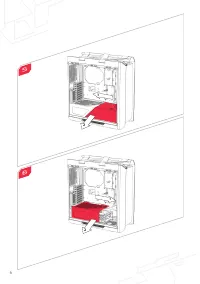
- Pagina 4 – Remove the PSU Cover
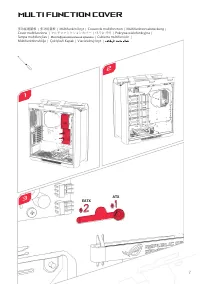
- Pagina 6 – Multi Function Cover
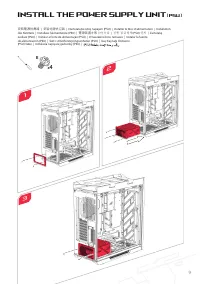
- Pagina 7 – Install the Power Supply Unit
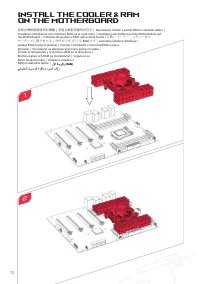
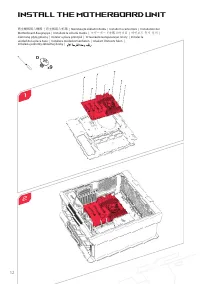
- Pagina 10 – Install the Motherboard Unit
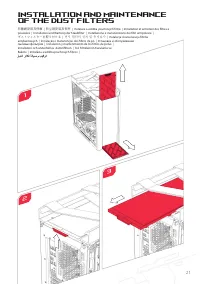
- Pagina 13 – Installation and Maintenance
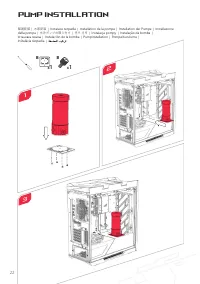
- Pagina 14 – Pump Installation
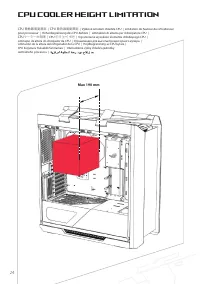
- Pagina 16 – CPU Cooler Height Limitation
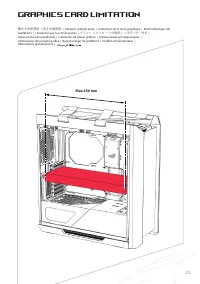
- Pagina 17 – Graphics Card Limitation
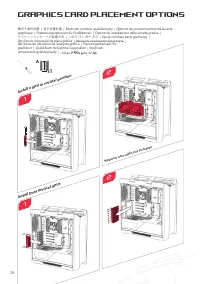
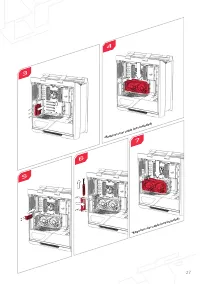
- Pagina 18 – Graphics Card Placement Options
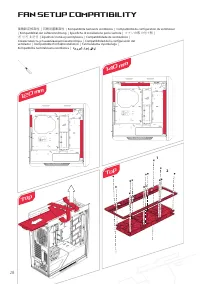
- Pagina 20 – Fan Setup Compatibility; Top
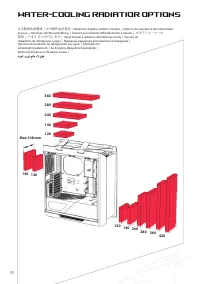
- Pagina 21 – Water-cooling Radiatior Options
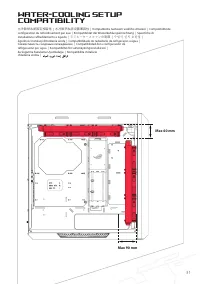
- Pagina 22 – Compatibility
- Pagina 27 – AEEE Yönetmeliğine Uygundur.
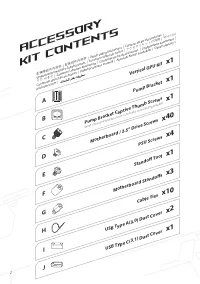
Accessory
Kit Contents
配備零組件內容物
|
配备组件内容物
| Obsah sady př
íslušenst
ví | C
ontenu du k
it d'ac
cessoir
es |
Verpack
ungsinhalt des Z
ubehörsa
tzes | A
ccessor
i con
tenuti nel k
it |
アクセサリキットの内容
|
액세서리
키트 내용물
| Za
wartość z
estawu akc
esorió
w | C
onteúdo do k
it de ac
essór
ios | С
одер
жимое к
омплек
та |
Cont
enido del k
it de ac
cesor
ios |
Tillbehörssa
tsens innehåll | A
ksesuar K
itinin İçindek
iler | Obsah súpr
avy s
príslušenst
vom |
Cable Ties
x10
USB Type A(3.0) Dust Cover
x2
USB Type C(3.1) Dust Cover
x1
Motherboard Standoffs
x3
Standoff Tool
x1
Motherboard / 2.5” Drive Screws
x40
x1
Pump Bracket
x1
Vertical GPU Kit
x1
PSU Screws
x4
A
B
C
D
E
F
G
H
I
J
2
Pump Bracket Captive Thumb Screws
(Note: the pump bracket screw is included on the pump bracket)
"Caricamento delle istruzioni" significa che è necessario attendere finché il file non è caricato e pronto per la lettura online. Alcune istruzioni sono molto grandi e il tempo di caricamento dipende dalla velocità della tua connessione a Internet.
Questo manuale ti è stato utile?
Informazioni su questo manuale
- Marca
- Asus
- Modello
- GX601
- Tipo di documento
- Manuale d'uso
- Categoria
- Custodia per PC
- Lingua/e
- Tedesco, Inglese, Spagnolo, Francese, Italiano, Dutch, Polacco, Russo, Swedish
- Pagine
- 27
- Dimensione file
- 3,4 MB
- Formato
Sommario
4 Remove the Side Panels 1 3 移除側面板 | 移除侧面板 | Sejm ě te bo č ní panely | Retirer les panneaux latéraux | Entfernen der Seitenwände | Rimuovete i pannelli laterali | サイドパネルを取り外す | 측면 패널 제거 | Zdejmij panele boczne | Remover os painéis laterais | Снимите боковые панели | Quite los paneles laterales | Ta...
5 Remove the PSU Cover 移除電源遮板 | 移除电源盖板 | Sejm ě te kryt PSU | Retirer le couvercle du bloc d'alimentation | Entfernen der Netzteilabdeckung | Rimuovete la cover dell'alimentatore | 電源装置カバーを取り外す | PSU 커버 제거 | Zdejmij pokryw ę PSU | Remover a tampa da fonte de alimentação | Снимите крышку блока питани...
Multi Function Cover 多功能遮蓋板 | 多功能盖板 | Multifunk č ní kryt | Couvercle multifonction | Multifunktionsabdeckung | Cover multifunzione | マルチファンクションカバー | 다기능 커버 | Pokrywa wielofunkcyjna | Tampa multifunções | Многофункциональная крышка | Cubierta multifunción | Multifunktionshölje | Çok İş levli Kapak |...
Fai una domanda
Manuali correlati
Altri elettrodomestici Asus
 Asus 90YH00Q1 Manuale d'uso
 Asus AC66 Manuale
 Asus AIR Manuale d'uso
 Asus B1MR Manuale d'uso
 Asus BT1AD Manuale d'uso
 Asus D2X Manuale d'uso
 Asus ET2203T Manuale d'uso
 Asus Gx1008b Manuale d'uso
 Asus H61M-K Manuale d'uso
 Asus HS-W1 Manuale d'uso
 Asus K61IC Manuale d'uso
 Asus M2N-SLI Deluxe Manuale d'uso
 Asus M2N68-CM Manuale d'uso
 Asus M4A78LT-M LE Manuale d'uso
 Asus MB19TU Manuale d'uso
 Asus N43SL Manuale d'uso
 Asus N53Jq Manuale d'uso
 Asus N61Vn Manuale d'uso
 Asus NFC EXPRESS Manuale d'uso
 Asus P4C800-E Deluxe Manuale d'uso